FrostBound : Common Solutions for FrostBound Crash Issues
Common Solutions for FrostBound Crash Issues
Dear Lords of FrostBound,
Thank you for standing strong in the frozen land of FrostBound! On launch day, our peak concurrent player count reached 1,257, more than three times the demo’s numbers. As the studio’s first title, this result is an incredible encouragement for us, and we will continue sprinting forward to improve the gameplay experience.
Regarding the most frequently reported optimization and crash issues:
First, we would like to explain that the game was developed using Unreal Engine 5. For a team with only one programmer (who is also the producer and lead game designer), this has indeed been a major challenge. We’ve compiled a list of real cases where players successfully resolved common issues. We hope these examples help you as well. If the problem persists, it may be related to hardware limitations that we are unable to fix directly. We appreciate your patience and understanding!
Fatal Error Issues (Crash / Black Screen / Unable to Enter Game)
This is the most commonly reported crash. After testing, players have successfully resolved the issue with the following methods:
- Solution 1 (Highly Recommended): Update Your Graphics Driver
Players using both NVIDIA and AMD GPUs reported that updating to the latest official driver directly resolved the issue.
You may download the latest drivers from the official websites:
– NVIDIA users:
https://www.nvidia.com/en-us/geforce/drivers/
– AMD users:
https://www.amd.com/en/support/download/drivers.html
- Solution 2 (Important for Players Who Played the Demo)
This type of issue mostly occurs for players who previously played the demo. Common symptoms include:
– Black screen or freeze on first entering the tutorial battle
– Freeze after finishing the tutorial when entering the main game
Please download and extract the provided save file (progress: tutorial completed), then overwrite the folder at the following path: %USERPROFILE%AppDataLocalCardSaved
Save File Download here:
https://drive.google.com/file/d/1CBFg8QpXiLPoW28LwMzV6KaFvj49WaML/view?usp=drive_link
- Solution 3 (Cyber Miracle Doctor?):
https://www.bilibili.com/video/BV19wTZzQEBH/?vd_source=763aeff8f64729a21f9b9d8d64ca8dd4
- Solution 4 (Potential Fix): Check C++ Runtime Libraries and DirectX
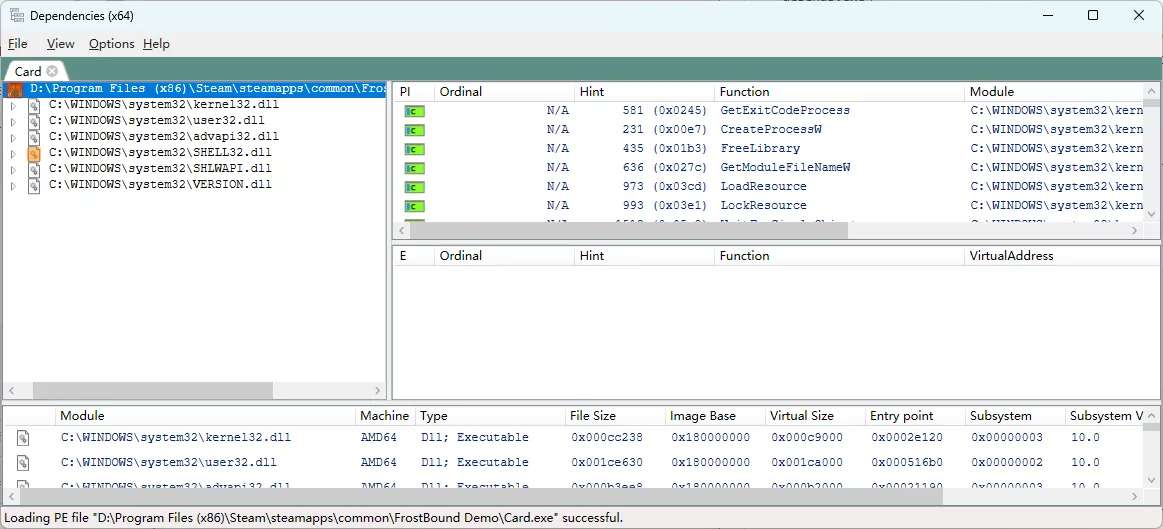
You may download a repair tool, or download the Release version from:
https://github.com/lucasg/Dependencies?tab=readme-ov-file
Open the game’s EXE with this tool to check dependencies. Any red items indicate missing libraries. (Please note the expandable arrow on the left.)
- Solution 5 (Low Probability): Verify Game File Integrity
In Steam Library → FrostBound → Properties → Installed Files → Verify integrity of game files
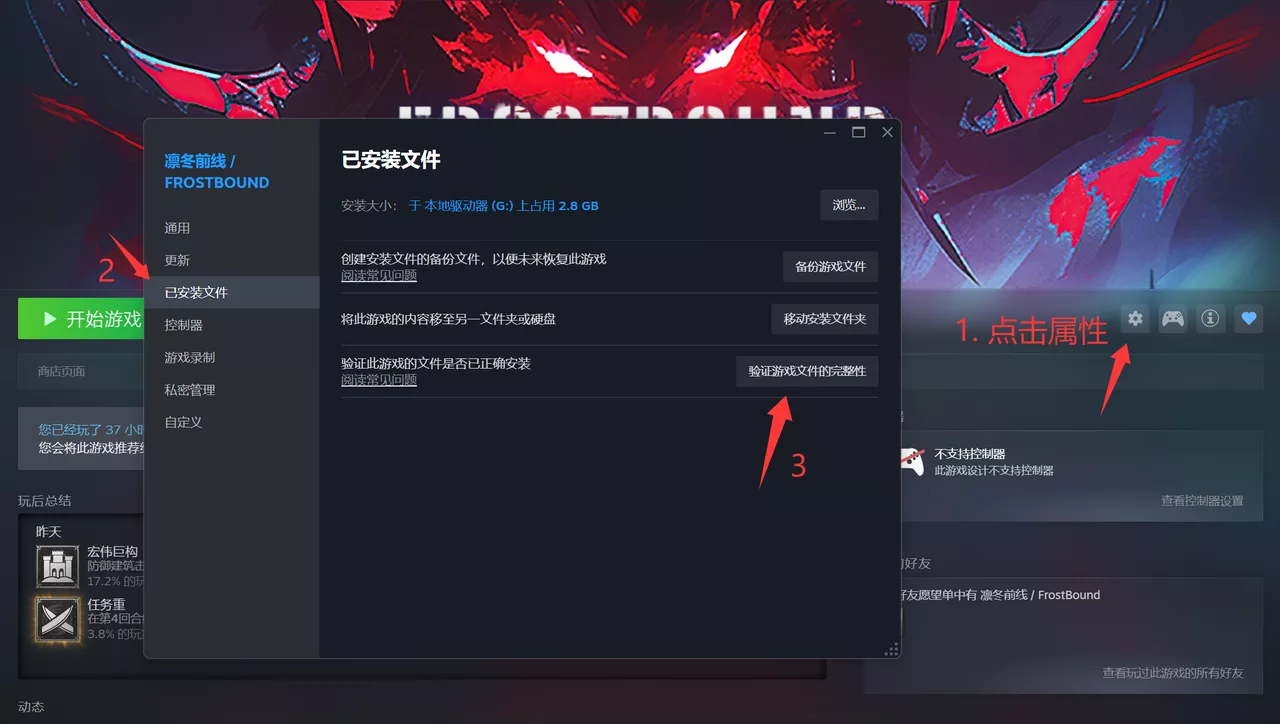
If any of the solutions above resolve your issue, please share your experience in the comments. Your feedback may help many more Lords who wish to enter FrostBound, and it means a lot to us!
If you have discovered additional solutions, please also share your insights. As a small team, our abilities are limited, but we want to do everything within our power to help everyone enjoy the game.
Thank you all!
Lyra Studio
—
Join Our Community & Follow Us for Updates and Behind-the-Scenes Content:
Facebook:
https://www.facebook.com/people/FrostBound/61577092110005/?_rdr
Instagram:
https://www.instagram.com/frostbound.official/
Discord: